
Free CRM for Freelancers: Tools, Setup, and How Zenlance Simplifies It
Freelancers rarely lose work because they lack skills. More often, they lose work because they lose track of leads, forget to follow up, or cannot see what is happening in their pipeline. When client conversations are scattered across email, DMs, Upwork messages, Fiverr inboxes, spreadsheets, and notes apps, it becomes difficult to stay consistent. The result is missed opportunities, slow response times, and unstable income.
A free CRM for freelancers can solve these problems by giving you one place to store contacts, track proposals, schedule follow-ups, and view your active projects at a glance. This guide explains what to look for in a free CRM, how to set it up step-by-step, and how Zenlance supports a workflow that is designed for freelancers who win clients through marketplaces and repeat engagements.
Table of Contents
- What Is a Free CRM for Freelancers?
- Step 1: Identify Your Client Management Needs
- Step 2: Compare the Best Free CRM Options
- Step 3: Set Up Your CRM Workflow
- Step 4: Build a Follow-Up System That Actually Works
- Step 5: Track Project Delivery and Retention
- Step 6: Review and Improve Your Pipeline Weekly
- How Zenlance Simplifies Freelance CRM
- Frequently Asked Questions
- Recommended
- Backlink Outreach Opportunities
Quick Summary
| Key Insight | Explanation |
|---|---|
| Freelancers need structured tracking | When leads and follow-ups live in multiple places, deals get lost and income becomes unpredictable. |
| Free CRM plans can be enough | Many tools offer contact management, pipelines, and basic tasks at no cost. |
| Setup matters more than the tool | A simple pipeline and consistent follow-up routine usually beats a complex system that you do not use. |
| Marketplace workflows are different | Upwork and Fiverr freelancers often need proposal tracking and message follow-up timing, not just “deals.” |
| Zenlance fits freelancer-specific needs | Zenlance connects proposal creation and client management to reduce manual work and improve consistency. |
What Is a Free CRM for Freelancers?
A CRM (Customer Relationship Management system) is a tool that stores client details and helps you manage relationships over time. For freelancers, the “relationship” includes every step from first contact to proposal, onboarding, delivery, invoicing, and repeat work. A free CRM for freelancers usually offers a limited set of features (such as contacts, pipelines, and basic tasks), which can still be more than enough for a solo operator.
In practical terms, a freelance CRM should help you answer questions like:
- Who are my active leads right now?
- Which proposals are waiting for a reply?
- Who needs a follow-up this week?
- Which clients are ongoing, and what is the next milestone?
- Which past clients are likely to buy again?
Many freelancers try to solve these questions with spreadsheets and calendars. That can work early on, but manual systems break down when you manage multiple conversations per day. A CRM creates repeatable structure so you can scale without sacrificing responsiveness.
For general CRM background and why centralizing data helps sales consistency, you can reference HubSpot’s CRM education resources here: what is a CRM.
Step 1: Identify Your Client Management Needs
Before you choose a CRM, define what you actually need it to do. Many free tools look attractive, but they are designed for sales teams with complex pipelines. Freelancers typically need fewer features, but they need them to fit their real workflow.
Start by mapping how clients find you and how you close work. A freelancer who gets inbound leads from a website needs different stages than a freelancer who sends daily proposals on Upwork. A freelancer who sells fixed-price packages on Fiverr needs different fields than a freelancer who sells long-term retainers.
Use the checklist below to clarify your requirements:
- Lead sources: Upwork, Fiverr, referrals, LinkedIn, website, communities, email outreach
- Sales motion: proposal-first, call-first, chat-first, package purchase, retainer renewal
- Typical project length: one-off, multi-week, monthly retainer
- Communication channels: marketplace inbox, email, Slack/Discord, Zoom calls
- Tracking needs: follow-ups, value estimates, deadlines, deliverables, contract status
The best CRM is the one that mirrors your real client journey and makes the next action obvious.
Pro tip: Write down your “minimum viable workflow” first: contact name, lead source, status, next follow-up date, and estimated value. If a tool cannot support that cleanly, it will not feel helpful.
If you work heavily on marketplaces, it also helps to understand how those platforms structure proposals, conversations, and orders. For example, Upwork’s official documentation and support articles can clarify how messaging and contracts work: Upwork Help Center. Fiverr’s help center covers orders, messaging, and gig management: Fiverr Help Center.
Step 2: Compare the Best Free CRM Options
Once you know what you need, compare tools based on usability and fit. “Free” can mean different things: some CRMs are free forever with limited features, while others are free trials. For freelancers, the goal is to avoid paying for complexity you will not use.
Common options freelancers evaluate include:
- HubSpot CRM (free plan): often used for contact management and pipelines
- Zoho CRM (free edition): can work for simple pipelines, depending on current plan limits
- Notion: flexible database-based CRM templates
- Airtable: spreadsheet-meets-database systems with views and automations (free tier varies)
- Google Sheets: manual CRM that can be effective with discipline
When choosing, focus on these criteria first:
- Speed of use: how fast you can add a lead and set a next action
- Pipeline clarity: can you see what is stuck and what needs attention
- Task/reminder support: does the tool reliably surface follow-ups
- Customization: can you add fields like “platform,” “proposal link,” “portfolio sent”
- Exportability: can you export data if you change tools later
Comparison Table: What Freelancers Actually Need
| Feature | HubSpot Free | Zoho Free | Notion | Spreadsheet | Zenlance |
|---|---|---|---|---|---|
| Contact management | Yes | Yes | Custom | Manual | Yes |
| Pipeline view | Yes | Yes (varies) | Custom | Manual | Yes |
| Follow-up reminders | Basic | Basic (varies) | Manual/automations | Manual | Yes |
| Proposal tracking | Manual | Manual | Manual | Manual | Built-in |
| Marketplace-oriented workflow | No | No | No | No | Yes |
| Easy reporting (wins, losses, value) | Moderate | Moderate | Custom | Manual | Yes |
Pro tip: If you rely on proposals as your primary sales action (common for Upwork and Fiverr), prioritize tools that make proposal status and follow-up timing easy to track. Otherwise, you will default back to your inbox.
For pipeline structure and why stage-based tracking improves predictability, Ahrefs provides a helpful overview of sales pipeline concepts: sales pipeline guide.

Step 3: Set Up Your CRM Workflow
After choosing a tool, your next goal is setup that supports daily execution. Most freelancers fail here by building a perfect system instead of a usable one. Your CRM should answer one question every time you open it: “What should I do next?”
Start with a simple pipeline. You can always refine it later.
Suggested Pipeline Stages for Freelancers
- New lead: you have a name and a conversation started
- Qualified: budget, scope, and timing are realistic
- Proposal sent: you sent an offer or bid
- Follow-up scheduled: you set a date for the next touchpoint
- Negotiation: requirements, price, or timeline is being finalized
- Won / active project: contract accepted and delivery started
- Completed: final delivery done, awaiting review/feedback
- Retention / repeat: client is a candidate for ongoing work
Then define standard fields. Keep fields minimal; too many fields slows you down.
Minimum Fields to Add (Recommended)
- Client name (or company)
- Source (Upwork, Fiverr, referral, inbound, outbound)
- Service type (e.g., web design, copywriting, video editing)
- Estimated value (project total or monthly)
- Next action (follow up, send samples, book call, revise scope)
- Next action date (the date you will do it)
If your CRM does not prompt a next action, it becomes a record-keeping tool instead of a growth tool.
Pro tip: Use “next action date” as your primary daily driver. Each day, filter by leads where the next action date is today or overdue.
Setup Checklist
- Create pipeline stages based on your real workflow
- Add the minimum fields you will actually fill in
- Import existing contacts (or add your last 20 leads manually)
- Create a “Today” view (next action date is today/overdue)
- Create a “Waiting” view (proposal sent, awaiting response)
- Create a “Retention” view (past clients to re-engage)

Step 4: Build a Follow-Up System That Actually Works
Follow-up is where freelancers win. Most leads do not respond to the first message, even when they are interested. A professional follow-up system increases conversions without additional lead generation. The key is to make follow-up routine-based rather than emotion-based.
When follow-up depends on memory, it becomes inconsistent. A CRM should turn follow-up into a simple queue: open your “Today” view, complete the actions, then stop.
Follow-Up Timing Framework (Simple and Effective)
- Day 0: send proposal
- Day 2: short check-in and clarify any question
- Day 5: provide one relevant example or outcome
- Day 10: ask if timing changed; offer a next step
- Day 20: close the loop politely and leave the door open
This framework is intentionally light. You can adjust based on your niche and the urgency of the work, but the main point is to create a default schedule so you never wonder what to do next.
The right follow-up is a service: it makes it easy for the client to make a decision.
Pro tip: Write two follow-up templates: one for “just checking in” and one for “sharing a useful example.” Store them in your CRM notes so you can reuse them quickly.
Follow-Up Checklist Table
| Follow-Up Type | When to Use | What to Include |
|---|---|---|
| Quick nudge | 48 hours after proposal | One sentence, clear question, easy reply |
| Value add | 5–7 days after proposal | Relevant sample, brief recommendation, next step |
| Decision support | 10–14 days after proposal | Timeline options, scope clarity, risk reduction |
| Close the loop | 20+ days after proposal | Polite closure, invitation to reconnect later |
For freelancers who want to standardize workflows, Google’s guidance on building reliable processes and systems (even outside of SEO) reinforces the value of consistent structures and checklists: Google Search Central documentation.
Step 5: Track Project Delivery and Retention
CRMs are not only for sales. For freelancers, delivery is a major driver of repeat work. When you track delivery milestones and client satisfaction signals, you improve retention and reduce the time spent finding new leads.
To make your CRM useful after a deal is “won,” add a lightweight delivery layer. You do not need full project management features. You need enough structure to prevent missed milestones and to remind you to re-engage after completion.
What to Track During Active Projects
- Kickoff date and key milestones
- Next deliverable and due date
- Approval checkpoints (client review dates)
- Scope changes (brief note on changes)
- Upsell opportunities (future needs or adjacent services)
A finished project is not the end of the relationship. It is the start of the retention cycle.
Pro tip: Create a “30-day re-engagement” task for every completed project. Even a short check-in can trigger repeat work or referrals.
Simple Retention Pipeline (Optional)
- Completed (awaiting feedback)
- Delivered (happy client)
- Follow-up scheduled
- Repeat opportunity
- Retainer / ongoing
If you sell services as packages, retention can also mean offering a higher-tier package, maintenance, optimization, or monthly support. Tracking these in a CRM helps you build more stable income over time.
Step 6: Review and Improve Your Pipeline Weekly
A CRM becomes powerful when you review it consistently. The goal is not to “manage data,” but to make better decisions and maintain momentum. A weekly review can take 20–30 minutes and prevents leads from going stale.
Use a standard weekly review process:
- Open your pipeline and identify leads stuck in “proposal sent” for more than 7 days
- Schedule follow-ups for every lead that has no next action date
- Mark wins and losses (so your pipeline reflects reality)
- Review your retention list and schedule 2–5 re-engagement messages
- Estimate next month’s revenue using active deals and probabilities
Your CRM is a planning tool. If it is accurate, it reduces uncertainty and improves your week.
Pro tip: Track one simple metric: proposals sent vs. wins. Over time, your CRM will show whether you need more leads or better follow-up and qualification.
Qualification Questions to Reduce Wasted Time
If you often send proposals that do not convert, improve qualification. Add a short set of questions you ask early. Your CRM can store the answers for quick reference.
- What is the goal of the project?
- What outcome would make this a success?
- What is the budget range?
- What is the deadline or decision timeline?
- Who approves the work?
These questions reduce back-and-forth and allow you to write more precise proposals. They also help you identify leads that are not ready to buy.
How Zenlance Simplifies Freelance CRM
Many general CRMs can store contacts and deals, but they do not fit how freelancers win work on marketplaces. Marketplace freelancers manage rapid proposal cycles, multiple short conversations, and competitive bidding. Generic CRMs often require manual customization to track proposal status, job links, and follow-up timing.
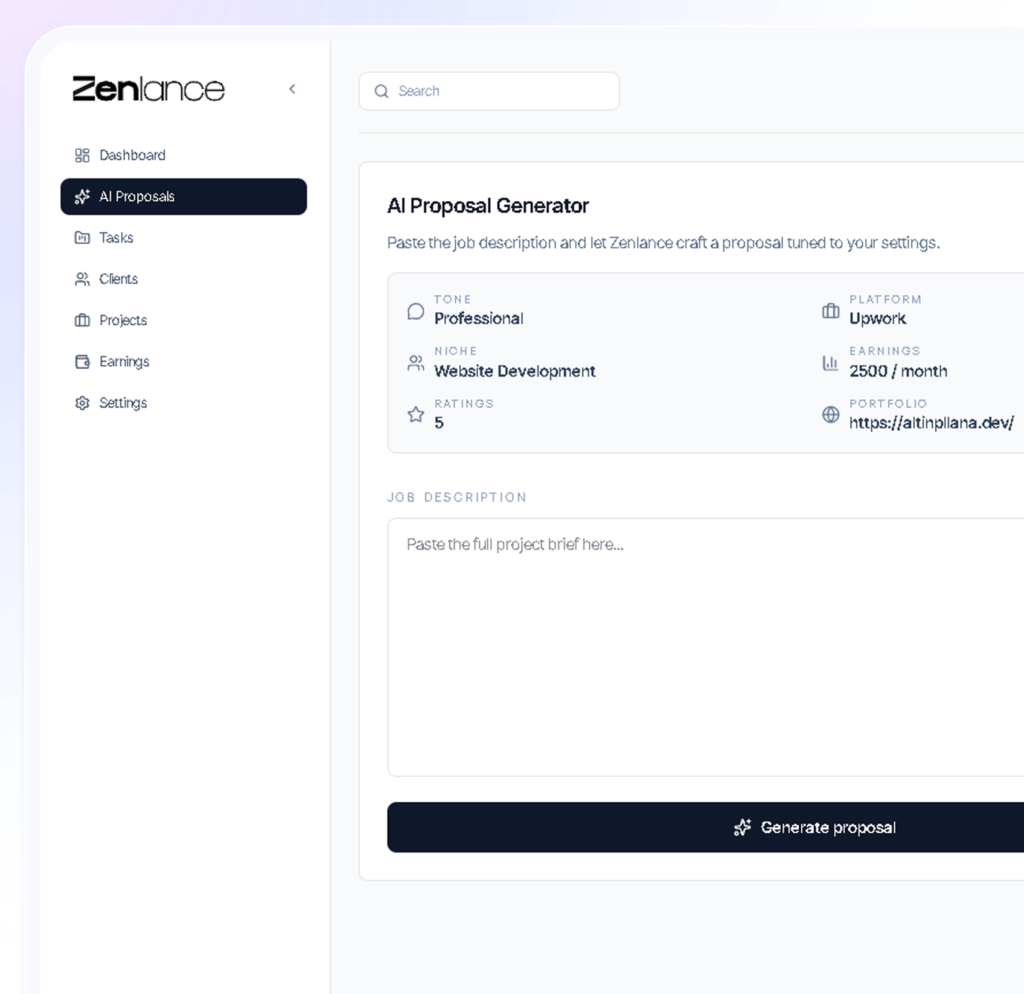
Zenlance is designed around freelancer workflows, combining client management with proposal creation and tracking. Instead of bouncing between a CRM and separate proposal tools, Zenlance supports an integrated workflow that helps you act faster and stay consistent.
Freelancer Pain Points Zenlance Addresses
- Scattered information: client notes, proposal details, and follow-up status live in different places
- Inconsistent follow-up: freelancers forget to re-engage after sending proposals
- Proposal repetition: writing new proposals from scratch wastes time and reduces volume
- Pipeline blindness: it is difficult to see what is pending vs. truly active
- Retention gaps: completed clients are not systematically re-engaged
A freelance CRM should reduce admin effort while improving speed and consistency in the proposal-to-delivery cycle.
Pro tip: If you are sending proposals frequently, your CRM should make it easy to record “proposal sent,” set a follow-up date, and store a quick summary of client requirements in one place.
In this context, Zenlance functions as more than a database. It is a workflow system that supports a freelancer’s daily actions: generating proposals, tracking conversations, scheduling follow-ups, and maintaining visibility across active and potential clients. If your current system is a spreadsheet plus reminders plus copy-paste proposals, consolidating these workflows can reduce missed opportunities.
When evaluating whether to use a general free CRM for freelancers or a freelancer-specific workflow platform, consider where you spend the most time: manual tracking or client-facing work. If manual tracking is growing, it is a signal your process needs consolidation.
Frequently Asked Questions
What is the best free CRM for freelancers?
The best choice depends on how you get clients and how you follow up. Some freelancers do well with a general CRM like HubSpot for contacts and pipeline visibility, while others need freelancer-specific proposal tracking. If you need proposal workflows tied closely to client tracking, Zenlance may fit better than a generic free CRM for freelancers.
Can I use Notion as a CRM if I want a free option?
Yes. Notion can work as a flexible CRM because you can create databases for leads, clients, and projects. The tradeoff is that you must build and maintain the workflow yourself, including reminders and consistent “next action” habits.
Are spreadsheets good enough for managing clients?
Spreadsheets can work at a low volume, especially if you keep a strict process. However, they are easy to neglect, and they do not naturally surface follow-ups or automate reminders. If you find yourself forgetting to follow up, a structured CRM is usually worth adopting.
Do I need a CRM if I only use Upwork or Fiverr?
Marketplace inboxes store conversations, but they do not always provide a clear pipeline view, follow-up schedule, or retention planning. A CRM helps you track proposal outcomes, build a repeatable process, and maintain visibility across multiple opportunities.
How does Zenlance differ from a traditional CRM?
Traditional CRMs are typically designed around sales teams and general deal pipelines. Zenlance is designed for freelancers, combining proposal creation and client tracking so you can manage the full proposal-to-delivery workflow without building everything manually.
How often should I update my CRM?
Update it daily in small increments (adding leads, setting follow-up dates, moving stages). Then do a weekly review to clean up stale deals, plan follow-ups, and re-engage past clients. The best CRM is the one you keep accurate.
What should I track to increase repeat clients?
Track project completion dates, satisfaction signals (positive feedback, smooth delivery), and a scheduled re-engagement date. Simple reminders to check in 30–60 days after completion can lead to repeat work, referrals, and retainers.
Recommended
- How to Track Freelance Leads Without Losing Deals
- Best Proposal Tools for Upwork Freelancers
- Freelancer Client Management Guide: Systems That Scale
- How to Follow Up After Sending a Proposal
- Freelance Sales Pipeline Template (Simple Stages That Work)
Backlink Outreach Opportunities
- HubSpot Blog: The article complements CRM education topics and speaks to a clear solo business use case.
- Ahrefs Blog: The pipeline and process sections align with pipeline strategy content and conversion workflows.
- High-quality freelancer resource sites: Blogs that cover freelancing systems, client management, and marketplace growth often link to practical “how-to” CRM guides.
External references included in this article: HubSpot CRM education (resource), Upwork Help Center (resource), Fiverr Help Center (resource), Ahrefs sales pipeline guide (resource), Google Search Central documentation (resource).