Best AI Tools for Freelancers to Win More Clients in 2026
The right AI tools for freelancers are no longer optional — they are the difference between a full pipeline and an empty one. According to the Upwork Research Institute, freelancers who adopt AI consistently report up to 40% productivity gains, and 90% say AI accelerates their skill development. More importantly, freelancers who blend AI with their own expertise achieve 48% higher proposal win rates than those who rely on either approach alone. The numbers are clear: AI tools for freelancers are not replacing independent professionals — they are separating the ones who win clients from the ones who struggle to get replies.
The challenge is not a shortage of options. The market is flooded with tools that promise to transform your freelance business overnight. Most of them are built for marketing teams, large agencies, or enterprise workflows — not for a solo professional who needs to write proposals before noon, deliver a project by end of day, follow up with leads, and still update their Upwork profile. The AI tools for freelancers that genuinely move the needle are not the ones with the most features or the flashiest landing pages. They are the ones that solve the specific bottlenecks freelancers face: getting in front of more clients, communicating faster, delivering better work, and staying organized without hiring a team.
This guide breaks down the most effective AI tools for freelancers by category — proposals, client management, writing, design, research, and meetings — so you can build a lean, high-impact stack rather than spending $200 a month on subscriptions you barely open. You will also find a dedicated section on Zenlance, the free AI-powered CRM built specifically for freelancers that handles proposals, client tracking, project management, and earnings reporting in one place. Whether you are on Upwork, Fiverr, Freelancer, or working with direct clients, the AI tools for freelancers in this guide will help you work faster, close more contracts, and keep everything organized as your business grows.
Table of Contents
- What Are AI Tools for Freelancers?
- Section 1: AI Tools for Freelancers — Proposals and Client Acquisition
- Section 2: AI Tools for Freelancers — CRM and Client Management
- Section 3: AI Tools for Freelancers — Writing and Content Delivery
- Section 4: AI Tools for Freelancers — Design and Visual Work
- Section 5: AI Tools for Freelancers — Research and Knowledge Work
- Section 6: AI Tools for Freelancers — Meetings and Client Communication
- Section 7: AI Tools for Freelancers — Automation and Workflow
- Section 8: Zenlance — The AI Tool Built Specifically for Freelancers
- Section 9: How to Build Your AI Stack Without Overspending
- Common Mistakes Freelancers Make With AI Tools
- AI Tools for Freelancers Setup Checklist
- Frequently Asked Questions About AI Tools for Freelancers
What Are AI Tools for Freelancers?
AI tools for freelancers are software applications powered by artificial intelligence that help independent professionals work faster, communicate better, win more clients, and manage their businesses more efficiently. They range from general-purpose assistants like ChatGPT — which can draft proposals, answer client questions, and brainstorm ideas — to specialized platforms built for specific tasks like design generation, meeting transcription, or workflow automation.
What makes the best AI tools for freelancers different from generic business software is the way they eliminate repetitive, time-consuming tasks that used to require either significant manual effort or a full support team. Writing a personalized proposal for each job posting on Upwork used to take 20–30 minutes per submission. AI proposal generators reduce that to under five minutes — without sacrificing quality, provided the output is reviewed and personalized before sending. Transcribing a 60-minute client call used to mean an hour of manual typing. AI meeting tools now handle that automatically and deliver action items before the call has ended.
77% of freelancers now use AI tools in their workflow, and those who do report productivity gains of 20–40% — with the biggest wins coming from repetitive tasks like proposals, emails, and client communication. Freelancers using AI handle 20% more clients on average than those who do not. (Sources: Upwork Research Institute; Fiverr 2025 Freelance Trends Report)
The practical impact is significant. The right AI tools for freelancers eliminate the administrative drag that eats into billable time — freeing you to take on more projects, communicate more clearly, and focus on the work that actually requires your expertise. This is not about replacing what you do. It is about removing the friction that slows you down before and after the work itself.
Section 1: AI Tools for Freelancers — Proposals and Client Acquisition
Proposals are where most freelancers lose the most time and win the least business. The average freelancer on Upwork spends 20–30 minutes writing each proposal and often sees response rates below 8%. The right AI tools for freelancers in this category can cut writing time by 60–80% while improving personalization — which is the single biggest driver of higher reply rates.
What Good AI Proposal Tools Do
The best AI proposal generators analyze the job description, identify the client’s core problem, and produce a tailored draft that addresses those specifics directly. They do not generate copy-paste templates. They use the language of the job post, mirror the client’s stated priorities, and structure the pitch around proof of results rather than generic credentials. The difference between a 5% reply rate and a 20%+ reply rate often comes down to how specifically the proposal speaks to the client’s actual situation — and that is exactly what these AI tools for freelancers are built to deliver at scale.
Key Tools in This Category
| Tool | Best For | Price | Standout Feature |
|---|---|---|---|
| Zenlance | Upwork, Fiverr, direct clients | Free | AI proposal generator + full CRM in one platform, built exclusively for freelancers |
| ChatGPT (Plus) | Any niche, highly flexible | $20/month | Most versatile; configure niche-specific prompts for best results |
| GigRadar | Upwork agencies and power users | Paid | Proposal analytics and A/B testing built in |
| Upwex | Upwork-only freelancers | Paid | Browser extension with job scoring and automated draft generation |
The critical rule with all AI tools for freelancers in the proposal category: always review and personalize the output before sending. AI gives you a strong, relevant first draft — your job is to add one specific detail from the client’s history, one result from your own portfolio, and a clear call to action. According to Upwork’s 2025 Freelance Trends Report, freelancers who blend AI drafts with personal input achieve 48% higher win rates than those who use either approach exclusively. The AI handles the structure and speed. You provide the authenticity that closes the deal.
Section 2: AI Tools for Freelancers — CRM and Client Management
One of the most underrated categories of AI tools for freelancers is client relationship management. Most freelancers operate without any formal system for tracking who they have pitched, what stage each client is at, which projects are active, and what follow-ups are overdue. They manage everything through a mix of email threads, browser tabs, and memory — and clients fall through the cracks as a result.
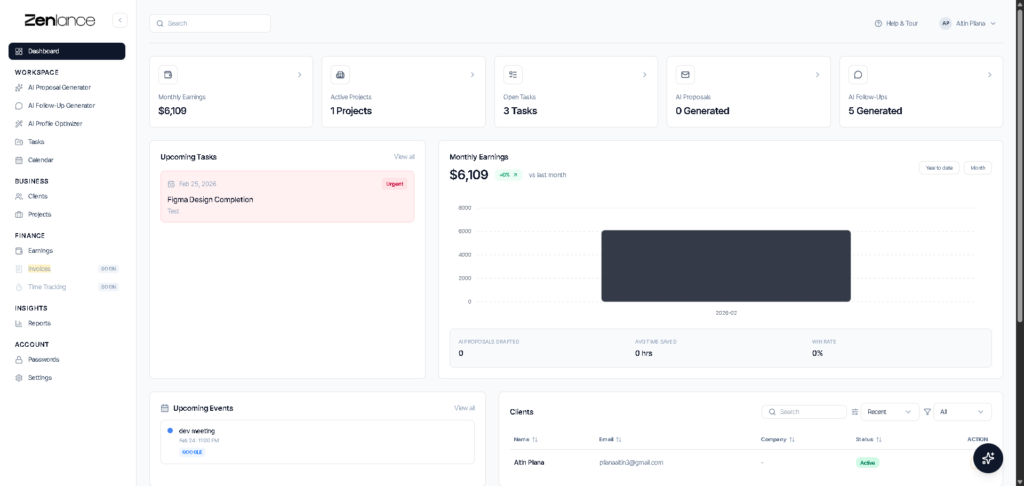
A CRM built for freelancers solves this by giving you a single dashboard that shows the full picture of your business at a glance: active clients, pending proposals, upcoming deadlines, and earnings across platforms. When you add AI to that foundation — for proposal generation, project tracking, and client communication — you move from reactive to proactive. Instead of scrambling to remember where a conversation left off, you have structured records that let you respond faster and follow up at exactly the right time.
The best AI tools for freelancers in the CRM category are built around how independent professionals actually work: one person, multiple clients, multiple platforms, and a constant need to stay organized without administrative bloat. Most general-purpose CRMs — HubSpot, Salesforce, Pipedrive — are designed for sales teams with pipelines and handoffs. They work well for agencies but create unnecessary overhead for solo freelancers. What you need is a system that handles the full client lifecycle from first proposal to final payment without requiring hours of setup or maintenance.
What to Look For in AI-Powered Freelance CRMs
- Client and project tracking in one place — no toggling between apps
- AI proposal generation that pulls from job descriptions automatically
- Earnings tracking across Upwork, Fiverr, and direct clients
- Task management with deadline visibility across all active projects
- Follow-up reminders and communication history per client
- Free to start — with no trial period or credit card required
Section 3: AI Tools for Freelancers — Writing and Content Delivery
For freelancers who deliver written content — blog posts, copywriting, email sequences, social media, technical documentation — writing-focused AI tools for freelancers can dramatically increase output without compromising quality. The key is understanding what each tool does well and where human judgment is irreplaceable.
ChatGPT (OpenAI)
ChatGPT remains the most versatile of all AI tools for freelancers who work with text. It handles brainstorming, outlining, drafting, research summaries, client email templates, and rewriting with equal competence. The free version covers basic needs. ChatGPT Plus at $20/month unlocks access to the most capable models, higher usage limits, and advanced features including image analysis and custom GPTs you can configure for specific client workflows or content types.
The most effective way to use ChatGPT is not to generate finished deliverables — it is to eliminate the blank-page problem and the first-draft friction. Give it a detailed brief, let it produce a structured draft, then apply your own voice, expertise, and client-specific context to produce the final version. Writers who use these AI tools for freelancers this way report cutting content production time by 40–60% without sacrificing the originality clients expect.
Grammarly
Where ChatGPT excels at generation, Grammarly excels at polish. It integrates directly into Gmail, Google Docs, Slack, LinkedIn, and most browsers — giving you real-time grammar, tone, and clarity suggestions everywhere you write, without copying and pasting into a separate tool. Trusted by over 40 million professionals, Grammarly catches the kinds of errors that erode client confidence: misplaced words, inconsistent tone, unclear sentence structure. For freelancers who communicate with clients constantly via email and messaging, Grammarly acts as a permanent safety net — one of the most used AI tools for freelancers in the writing space.
Grammarly’s premium tier ($12–$15/month) adds tone detection, rewrite suggestions, and advanced clarity improvements. For client-facing writing — proposals, status updates, deliverable introductions — premium is worth the cost. The free version is more than adequate for internal notes and routine communication.
Jasper
For freelancers who specialize in marketing copy — ads, landing pages, email campaigns, product descriptions — Jasper is one of the most purpose-built AI tools for freelancers in the content space. It includes templates optimized for specific formats such as AIDA frameworks, PAS structures, Facebook ad copy, and Google ad headlines, and lets you configure brand voice settings so outputs stay consistent across a client’s campaigns. Plans start at around $39/month, making it a better fit for freelancers whose clients pay copywriting rates that justify the tool cost.
Section 4: AI Tools for Freelancers — Design and Visual Work
Design was once the exclusive domain of trained professionals with years of software expertise. AI has not replaced designers — but it has dramatically expanded what non-designers can produce, and it has made professional designers significantly faster. These AI tools for freelancers are now essential across multiple niches.
Canva AI
Canva has become one of the most widely used AI tools for freelancers who create visual content — social media graphics, presentations, proposal decks, thumbnails, and brand materials. Its AI features include Magic Design (which generates full layouts from a text prompt), background removal, text-to-image generation, and smart resizing for different platforms. Freelancers using AI-powered design tools complete projects up to 50% faster, according to Adobe’s 2024 industry data.
The free tier covers most core needs. Canva Pro at $13/month unlocks the full AI feature set, brand kit management, and priority rendering. For virtual assistants, social media managers, content creators, or any freelancer who produces visual deliverables regularly, Canva Pro is one of the highest-ROI investments across all AI tools for freelancers.
Midjourney and DALL-E 3
For freelancers who work in creative industries — brand design, editorial illustration, concept visualization — Midjourney and DALL-E 3 are the leading AI image generators. Midjourney excels at stylized, artistic outputs and is widely used for mood boards, creative direction presentations, and unique visual concepts. DALL-E 3 (accessible through ChatGPT Plus) performs better for photorealistic and product-style imagery. Both tools allow designers to present clients with multiple creative directions in the time it used to take to develop a single concept — a major competitive advantage in pitching and early-stage client work.
Adobe Firefly
Adobe Firefly is built into the Adobe Creative Cloud suite and optimized for commercially safe AI-generated content — meaning the images are trained on licensed material, which matters when clients raise intellectual property concerns. For professional designers already using Photoshop or Illustrator, Firefly’s generative fill, background generation, and style matching features integrate directly into existing workflows without requiring a separate subscription.
Section 5: AI Tools for Freelancers — Research and Knowledge Work
Research-heavy freelancers — consultants, technical writers, market researchers, SEO specialists, and developers — have access to some of the most powerful AI tools for freelancers available. AI has not only made research faster but has changed what one person can credibly deliver within a project timeline that would previously have required a small team.
Perplexity Pro
Perplexity is a research-focused AI tool that answers questions with cited, real-time web sources rather than relying on a static training cutoff. For freelancers who need current data — market statistics, recent case studies, regulatory updates, competitor analysis — Perplexity is more useful than ChatGPT for research tasks because every claim comes with a source link you can verify. The free version covers most needs. Pro at $20/month adds faster responses, more daily queries, and access to more powerful underlying models, making it one of the most dependable AI tools for freelancers who work in information-intensive fields.
Notion AI
Notion AI turns the popular project management and note-taking platform into one of the most capable AI tools for freelancers who manage large volumes of information. It can summarize meeting notes, generate project briefs from bullet points, draft client deliverables from outlines, and answer questions about content stored in your workspace. If you already use Notion to manage clients and projects, the AI layer adds significant value without requiring a separate tool. The full AI feature set requires the Business plan at $20/month.
GitHub Copilot
For freelance developers, GitHub Copilot is one of the most impactful AI tools for freelancers in terms of measurable output. Developers using Copilot complete coding tasks 55% faster on average, according to research cited by Superhuman’s 2025 AI adoption report. Copilot integrates directly into VS Code and other IDEs, suggesting code completions, generating boilerplate, and explaining unfamiliar codebases in plain language. At $10/month for individuals, it delivers one of the clearest returns on investment across all AI tools for freelancers for developers billing above $20/hour.

Section 6: AI Tools for Freelancers — Meetings and Client Communication
Client calls are one of the biggest time drains freelancers deal with. You spend an hour in the meeting, another 30 minutes writing up notes, and another 15 minutes composing a follow-up email — all before any billable work has started. The AI tools for freelancers in this category automate everything after the conversation ends, so you can focus fully on the call itself and have a complete record ready before the other person has closed their laptop.
Otter.ai
Otter.ai joins your Zoom, Google Meet, or Microsoft Teams calls automatically, transcribes everything in real time, and generates a structured summary with action items at the end of each session. The free plan includes 300 minutes of transcription monthly — enough for five to six client calls. Otter Pro removes that limit and adds AI-generated meeting summaries, making it one of the most practical AI tools for freelancers who run regular client calls and want a reliable record without the manual effort.
Fathom
Fathom is a strong Otter alternative with a generous free tier that includes unlimited meeting recordings and AI-generated summaries. It integrates directly with Zoom and automatically highlights moments you mark as important during the call. For freelancers who conduct client discovery sessions, feedback reviews, or project check-ins, Fathom turns each meeting into a searchable, shareable record that eliminates the “I thought you said…” miscommunications that erode client relationships over time.
AI for Follow-Up Emails
One of the highest-leverage uses of AI tools for freelancers is generating follow-up emails directly from meeting transcripts. After a client call, paste the summary into ChatGPT with a clear prompt and you receive a professional, accurate recap in under two minutes — ready to send, complete with next steps and confirmed decisions. This replaces the 15-minute drafting session most freelancers put off until the end of the day, and it ensures nothing important is lost between the call and the follow-up.
Section 7: AI Tools for Freelancers — Automation and Workflow
The final tier of AI tools for freelancers is automation — connecting the tools you already use so that information flows between them without manual input. This is where the compounding benefit of a well-designed freelance AI stack becomes most visible. A freelancer who has automated their core workflows can manage significantly more clients at the same quality level, without working more hours.
Zapier
Zapier connects over 7,000 apps and uses AI to help you build automation workflows without writing code. For freelancers, the most useful automations include: automatically creating a task when a new client email arrives, logging Upwork contract starts to a tracking sheet, sending a reminder when a proposal has not received a reply, or triggering a follow-up sequence when a project is marked complete. The free plan covers basic single-step automations. Paid tiers start at $19.99/month and unlock multi-step workflows, filters, and AI-powered decision logic. Among AI tools for freelancers in the automation category, Zapier has the broadest app library and the lowest learning curve.
Make (formerly Integromat)
Make is a more powerful and flexible alternative to Zapier for freelancers comfortable with slightly more complex setup. Its visual workflow builder lets you create multi-step automations with branching logic — for example: if a new project is created in your CRM, automatically generate a welcome email, create a Notion page for the project, and add a deadline to your calendar. Make’s free tier is more generous than Zapier’s, making it a strong starting point for freelancers who want to automate workflows without an immediate paid commitment.
Clockify
For hourly freelancers or those who want to understand how their time is actually distributed across clients, Clockify is a free AI-enhanced time tracking tool that automatically categorizes tracked activities and identifies which tasks consistently take longer than expected. This data is directly useful for pricing — if you discover that client onboarding consistently consumes two hours of unpaid time per engagement, you can account for that in future project quotes. It is one of the most straightforward AI tools for freelancers for turning time data into better business decisions.
Section 8: Zenlance — The AI Tool Built Specifically for Freelancers
Most of the tools covered in this guide are general-purpose platforms that freelancers have adapted for their specific workflow. Zenlance is built differently — it is purpose-designed as a comprehensive set of AI tools for freelancers, combining everything a solo professional needs to win more clients and stay organized in a single free platform.
What Zenlance Includes
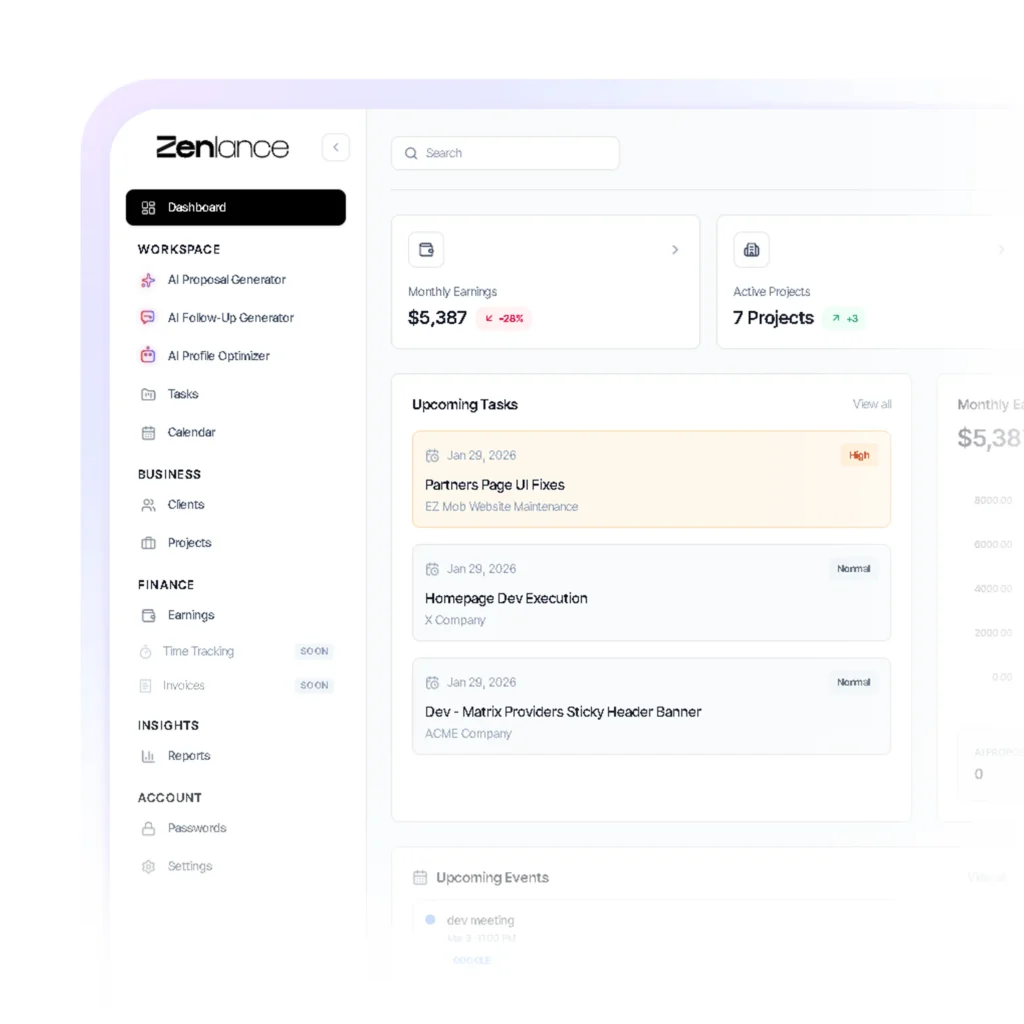
Rather than maintaining six separate tools — a proposal generator, a CRM, a project tracker, a task board, an earnings dashboard, and a password manager — Zenlance consolidates all of these into one organized workspace built around how freelancers actually operate:
- AI Proposal Generator: Paste a job description from Upwork, Fiverr, or any platform and Zenlance generates a personalized, professional proposal in seconds. It analyzes the requirements and tailors the language to the specific role — not a generic template. You review, refine, and send.
- Client CRM: Track every client, project, and communication in one structured system. Client history, project status, and contact details are all in one place — no more searching through email threads to remember where a conversation left off.
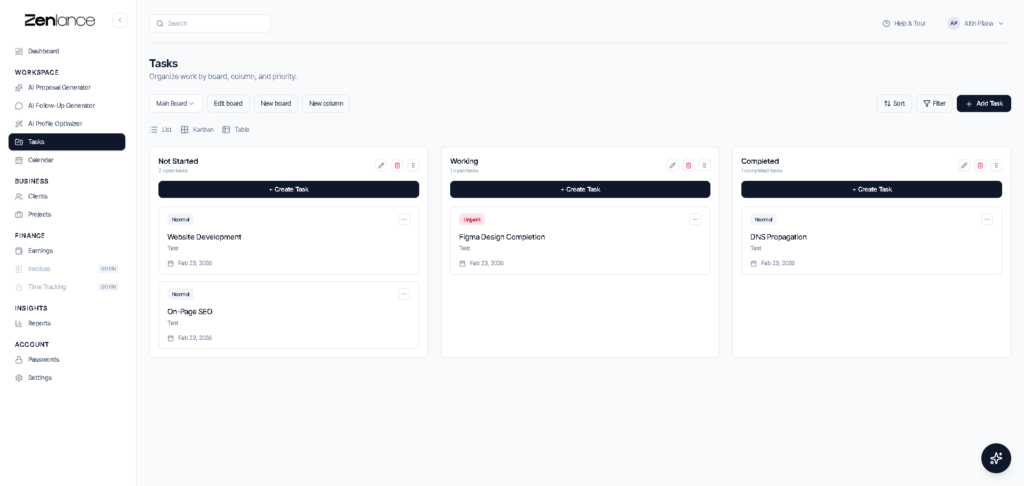
- Project and Task Management: Kanban-style boards with drag-and-drop task management. Create multiple boards per client, track progress across every active project, and never miss a deadline.
- Earnings Dashboard: Aggregate your income from Upwork, Fiverr, and direct clients into a single view. Set monthly goals, track progress, and see which platforms and clients are generating the most revenue.
- Password Manager: Store and manage client platform logins, tool credentials, and account access in one secure location — ending the time wasted hunting for login details across jobs.
Why Zenlance Works Better Than Stitching AI Tools Together
The problem with building a freelance AI stack from separate tools is that the gaps between them create work. You write a proposal in ChatGPT, paste it into Upwork, win the project, add the client manually to Notion, create a task in Trello, log the earnings in a spreadsheet, and store the client password in a notes app. Each individual tool works fine. The problem is the manual handoffs between them — each one a moment where something gets missed, delayed, or forgotten entirely.
Zenlance eliminates those gaps. The proposal, the client record, the project board, and the earnings tracker are all connected inside the same platform. When you win a client through an AI-generated proposal, you do not start over in a different tool — you continue in the same system, moving from acquisition to delivery to payment tracking without friction. For freelancers serious about scaling their income without scaling their admin overhead, Zenlance is the foundation that makes the rest of your AI tools for freelancers stack work more cohesively.
Zenlance is completely free to use — which makes it one of the only enterprise-grade AI tools for freelancers that costs nothing to start. You can access the full proposal generator, CRM, project management system, and earnings dashboard without a trial period or credit card. For freelancers evaluating tools before committing budget, there is no lower-risk way to upgrade your client acquisition and organization workflow immediately.
Section 9: How to Build Your AI Stack Without Overspending
One of the most common mistakes freelancers make when exploring AI tools for freelancers is subscribing to too many platforms too quickly. A $20 tool here, a $30 tool there, and suddenly you are spending $150–$200 per month on subscriptions that collectively save you two hours a week — a poor return. The smarter approach is to build your stack in phases, starting with free tiers and adding paid plans only when you have confirmed the time savings justify the cost.
Phase 1: Zero-Cost Foundation (Start Here)
Before spending anything, you can build a highly effective set of AI tools for freelancers using free plans alone. Start with Zenlance for proposals, CRM, and project management — it is completely free and covers the biggest bottlenecks most freelancers face immediately. Add the free tier of ChatGPT for writing assistance and brainstorming, Grammarly’s free browser extension for error-free client communication, and Canva’s free plan for any visual content you deliver. This zero-cost stack alone can save 5–8 hours per week for most freelancers, according to data cited across multiple 2026 freelance productivity studies.
Phase 2: Targeted Upgrades ($10–$20/month)
Once your core workflow is running on the free stack, identify the single biggest remaining bottleneck and add one paid tool to address it. If proposal quality is still inconsistent, ChatGPT Plus at $20/month is the highest-leverage upgrade for most freelancers. If you are a developer, GitHub Copilot at $10/month pays for itself in the first hour saved. If you conduct frequent client calls, Otter Pro removes transcription limits for $17/month. The guiding principle across all AI tools for freelancers: one upgrade at a time, with a 30-day evaluation before adding another.
Phase 3: Advanced Automation (When Scaling)
Once you are operating at capacity and looking to take on more clients without adding hours, automation tools become worth the investment. Zapier’s paid tiers or Make’s premium plans connect your existing tools into a system where information flows automatically between platforms. At this stage, the goal is not to work more efficiently on individual tasks — it is to build the kind of infrastructure that lets one person manage the workload of two or three, making your full stack of AI tools for freelancers function as a coherent system rather than a collection of separate subscriptions.
| Phase | Tools | Monthly Cost | Estimated Hours Saved/Week |
|---|---|---|---|
| Phase 1 — Free Foundation | Zenlance, ChatGPT (free), Grammarly (free), Canva (free) | $0 | 5–8 hours |
| Phase 2 — Targeted Upgrade | + ChatGPT Plus or GitHub Copilot or Otter Pro | $10–$20 | 8–12 hours |
| Phase 3 — Full Automation | + Zapier or Make + Notion AI | $30–$60 | 12–18 hours |
Common Mistakes Freelancers Make With AI Tools
Adopting AI tools for freelancers without a clear strategy leads to wasted subscriptions, inconsistent outputs, and the false conclusion that AI does not work — when the real problem is how the tools are being used.
1. Sending AI-generated proposals without editing them. The fastest way to tank your Upwork response rate is to submit a proposal that reads like a template. The best AI tools for freelancers give you a strong first draft — your job is to add one specific observation about the client’s situation, one result from your own portfolio, and a clear single question at the end. Clients can recognize unedited AI output, and it signals you did not read the job post carefully.
2. Subscribing to too many tools at once. Freelancers often sign up for five or six AI tools for freelancers in the same week, use each one superficially, and conclude none of them deliver value. The compounding productivity gains come from deep integration — when a tool becomes part of your daily routine rather than something you open occasionally. Start with one tool, use it for 30 days, measure the impact, then add the next.
3. Using general-purpose tools for specialized tasks. ChatGPT is excellent for writing but is not the best option for transcribing client calls, managing projects, or generating design assets. Using the right tool for each job — Otter for meetings, Zenlance for proposals and CRM, Canva for visuals — consistently produces better results than trying to force one tool into every situation.
4. Ignoring client management entirely. Many freelancers invest in AI tools for freelancers that improve their deliverables — writing quality, design speed, coding efficiency — but neglect the systems that manage the client relationship itself. Proposals that win clients are only valuable if the project management, communication, and follow-up are equally professional. Losing a client to disorganization after winning them with a great proposal is one of the most avoidable and costly freelance mistakes.
5. Not tracking ROI on paid subscriptions. If you are paying $20/month for a tool, it needs to demonstrably save you at least that much in time or generate at least that much in additional revenue to justify the cost. Keep a simple log of which AI tools for freelancers you use, how often, and what tasks they replace. Cancel anything that does not clear that bar within 60 days.
6. Skipping the free tier before upgrading. Almost every major platform in the AI tools for freelancers space offers a free tier that is genuinely useful. Start free, validate that the tool solves your actual problem, then upgrade. Do not pay for a premium plan before the free version is already part of your daily workflow.
7. Using AI to replace expertise rather than extend it. Clients hire you for your judgment, your experience, and your ability to solve problems. The best AI tools for freelancers handle the mechanical parts of your work faster — not the thinking. The moment AI replaces your judgment rather than supporting it, your deliverables start to feel generic, and clients notice. Use these tools to amplify what makes you valuable, not to substitute for it.
AI Tools for Freelancers Setup Checklist
- ☐ Sign up for Zenlance (free) and configure your client and project workspace
- ☐ Set up the Zenlance AI proposal generator for your primary platform (Upwork, Fiverr, or direct)
- ☐ Install Grammarly’s free browser extension across Gmail, Google Docs, and LinkedIn
- ☐ Create a free ChatGPT account and save a prompt template for your niche’s most common proposal type
- ☐ Set up a free Canva account and upload your client brand kits for any visual deliverables
- ☐ Set up Otter.ai or Fathom before your next client call — free tier is sufficient to start
- ☐ Identify your single biggest time bottleneck and match it to the right AI tool from this guide
- ☐ Log all active tool subscriptions with cost and weekly usage to track ROI
- ☐ Set a 30-day review date for each new tool before committing to keep or cancel
- ☐ Review your proposal win rate monthly and adjust your AI workflow based on real results
- ☐ Explore one simple automation in Zapier or Make to connect your core tools
- ☐ Revisit your Upwork or Fiverr profile and use AI-assisted improvements to headline and bio
Frequently Asked Questions About AI Tools for Freelancers
What are the best free AI tools for freelancers starting out?
The most effective starting point is a combination of Zenlance (free AI proposal generator plus full CRM), ChatGPT’s free tier for writing and brainstorming, Grammarly’s free browser extension for polishing client communication, and Canva’s free plan for visual content. Together, these AI tools for freelancers cover proposal writing, client management, written communication quality, and design without any monthly cost. Most freelancers who adopt this free stack report saving 5–8 hours per week from day one.
Do clients know when freelancers use AI tools?
Not automatically — and most clients do not object to AI use when the output is high quality, personalized, and professionally delivered. The safest approach is transparency: frame your use of AI tools for freelancers as an efficiency advantage that benefits the client through faster turnaround and more consistent quality. Never submit AI output directly without reviewing and personalizing it. That is where quality falls apart and clients notice the difference.
Can AI tools for freelancers actually improve my proposal win rate?
Yes — when used correctly. Freelancers who use AI to generate a strong, relevant first draft and then personalize it with specific observations about the client’s situation consistently achieve higher win rates. According to Upwork’s 2025 data, blending AI assistance with personal input produces 48% higher win rates than using either approach alone. The key variable is always personalization — the AI handles speed and structure; you handle the specificity that makes the client feel understood.
What is the difference between ChatGPT and a purpose-built tool like Zenlance?
General-purpose AI tools for freelancers like ChatGPT are flexible but require you to configure them for freelance-specific tasks — writing the right prompts, maintaining context, and manually moving outputs to other tools. Zenlance is built specifically around the freelance workflow: AI proposal generation, CRM, project tracking, and earnings reporting are all combined in one platform. You paste a job description and get a proposal — no prompting required. For freelancers who want results without setup complexity, Zenlance delivers the most immediate value of any AI tools for freelancers in the client acquisition and management category.
How much should I budget for AI tools as a freelancer?
Start at zero. Zenlance’s free plan plus free versions of ChatGPT, Grammarly, and Canva creates a genuinely effective stack. Once those are part of your daily workflow and delivering measurable time savings, consider one targeted upgrade. A practical rule: cap your total spend on AI tools for freelancers at 5–10% of your monthly freelance revenue until you can clearly demonstrate ROI on every active subscription.
Are AI tools for freelancers allowed on Upwork and Fiverr?
Both platforms allow freelancers to use AI tools as part of their workflow. Upwork’s AI policy permits AI assistance provided the freelancer takes responsibility for the quality and accuracy of deliverables. Fiverr has taken a similar position, even launching programs to help sellers integrate AI into their service offerings. Using AI tools for freelancers to write better proposals, organize your workflow, and improve deliverable quality is well within both platforms’ guidelines. The restriction is misrepresenting AI-generated work as wholly original human effort — not using AI itself.
How Zenlance Supports Your AI Tools for Freelancers Strategy
Knowing which AI tools for freelancers to use is one thing. Actually integrating them into a consistent daily workflow — without spending more time managing tools than using them — is where most freelancers struggle. Individual tools solve individual problems. What closes the gap between reading a guide like this and building a system that reliably produces more client wins, better organization, and fewer missed follow-ups is a connected workspace where the full client lifecycle is tracked in one place.
That is exactly what Zenlance is built to do. It combines the most critical AI tools for freelancers into a single free platform: an AI proposal generator that turns job descriptions into personalized pitches in seconds, a CRM for tracking every client and project, kanban-style task boards for managing active work, and an earnings dashboard that aggregates income across platforms.
Whether you are sending your first proposal on Upwork or managing ten active clients across Fiverr and direct contracts, Zenlance gives you the structure to stay organized, follow up on time, and close clients without the admin overhead that slows most freelancers down. Start free at zenlance.net and add the most important layer of your AI tools for freelancers stack today.
Recommended Reading
- Upwork Profile Optimization: The Complete Guide to Winning More Clients in 2026
- Upwork Job Success Score: How It Works and How to Improve It in 2026
- Fiverr Gig Optimization: The Complete Guide to Ranking Higher and Selling More in 2026
- Upwork Proposal Examples That Win Jobs: Free AI + Manual Templates (2026)
- How to Become Top Rated on Upwork: Step-by-Step Guide (2026)
- Free AI CRM for Freelancers: Manage Clients, Tasks, and Projects in 2026
- How to Get Your First Client on Upwork: A Step-by-Step Guide for 2026